Customer requirements, or want to deploy a large model yourself?
Looking at tens of billions of parameters and trembling, worried that the video memory will explode at any time? Don't panic!
This article will take you from theory to practice to thoroughly understand the memory usage of large model reasoning, allowing you to accurately plan resources like an expert and say goodbye to OOM anxiety!
👇👇👇
Part 1
Where does the GPU memory go? The four major core occupations revealed
When inferring a large model, your GPU memory is mainly occupied by the following four parts:
⚖️ 1. Model Weights
This is the most intuitive and fixed part. Its size is the volume of the model itself.
- 👑 Core position:
- This is the "basic disk" occupied by the video memory. Once the model is loaded, this space will continue to be occupied.
- Concept quick overview:
- Model weights are billions of parameters (Parameters) learned by the neural network after training. It is these parameters that constitute the "knowledge" of the model.
- Estimating formula:
Weight memory (GB) ≈ Amount of model parameters (B) × Number of bytes of a single parameter
The number of bytes of a single parameter depends on itsData precision (Precision):
- FP32 (single precision): 4 bytes
- FP16/BF16 (half precision): 2 bytes
- FP8 (8-bit floating point): 1 byte
- INT8 (8-bit integer): 1 byte
- INT4 (4-bit integer): ~0.5 bytes (with a small amount of overhead)
🧠 2. KV Cache (key value cache)
This is the most critical and alsoThe most dynamic changesThe part is the "culprit" that causes the memory explosion in long text or high concurrency scenarios.
- 💥Performance bottleneckIt is the largest variable when evaluating video memory, and directly determines how long the text and the amount of concurrency the model can handle.
- concept overviewDuring the process of autoregressive generation (generating word by word), in order to avoid repeated calculations, the model caches the "Key" and "Value" of all previous tokens. Each subsequent generation of a new token depends on the KV cache of all previous tokens.
- Estimating formula:
Total KV cache (GB) = number of concurrencies × (input + generation length) × KV cache size per Token
Among them, "KV cache size per Token" is determined by the model architecture:
KV cache (Bytes) per Token = 2 (representing k+v) × number of layers × number of KV headers × single header dimension × number of precision bytes
Here'sKV head quantityCrucially, it leads to the following concept.
🔬 3. Attention mechanism variants (MHA, GQA, MQA)
These three mechanisms directly affect the "number of KV headers", thus determining the size of the KV Cache.
- 💡 Optimization key: Select models with different attention mechanisms, and their KV Cache sizes may differ several times.
- Concept quick overview:
- MHA (Multiple Head Attention): original design,
Query head quantity = KV head quantity. Works well but KV Cache is huge. - MQA (Multiple Query Attention): Extremely saving graphics memory, all query heads are sharedthe only setKV head.
Number of KV heads = 1。 - GQA (Group Query Attention): a compromise solution where KV headers are shared within the group.
1 < number of KV heads < number of query heads. It achieves a good balance between effects and video memory, and is the choice of mainstream models such as Qwen and Llama.
📦 4. Activation value, workspace and framework overhead
This is "miscellaneous" overhead, which is not as large as the first two, but cannot be ignored.
- ⚠️Safety marginA certain amount of redundant space needs to be reserved for it, otherwise OOM may also occur.
- Concept quick overview:
- Activations: Temporary intermediate variables during calculation.
- Workspace: Temporary video memory pre-allocated by the underlying computing library (such as cuDNN).
- Framework overhead: Inference frameworks (such as vLLM, TensorRT-LLM) also require a small amount of video memory to run themselves.
Rule of thumb: This is usually estimated as 5% to 20% of the sum of "weight + KV Cache" as a safety margin.
Table: qwen3-coder-plus tiered fee table
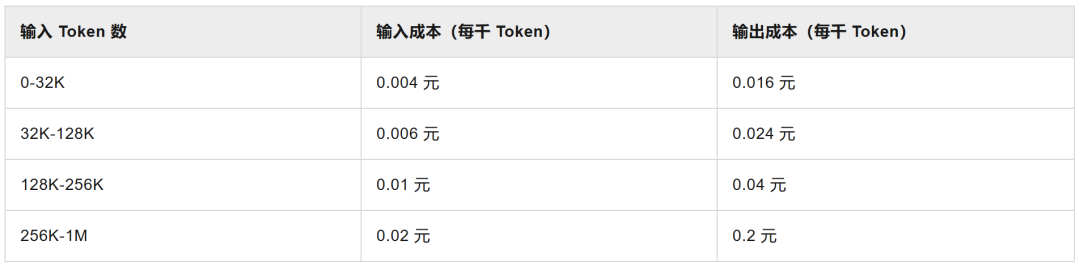
Note: KV Cache costs are different for contexts of different lengths, so some models charge tiered fees based on the number of input tokens.
Part 2
Practical drill: take you step by step to evaluate Qwen3-8B
Now that the theory is over, let’s get started with practice! Suppose we want to deploy Qwen/Qwen3-8B on ModelScope.
🕵️♂️ Step 1: Be a detective and look for clues from the model files
Find and open the configuration file on the model warehouse pageconfig.json, look for the following key fields:
"num_hidden_layers": 36(number of model layers L)"num_attention_heads": 32(query the number of headers Q)"num_key_value_heads": 8(Number of key value header KV)"head_dim": 128(single head dimension)"torch_dtype": "bfloat16"(default precision, 2 bytes)
At the same time, we know from the model introduction (README):
- Model parameters:8.2B(8.2 billion)
- Context length: natively supported32,768 tokens
✨ Key judgments
becausenum_key_value_heads(8) between 1 andnum_attention_heads(32) between usClearly determine that Qwen3-8B uses the GQA architecture. This means that when calculating the KV Cache, you should useNumber of KV heads = 8, instead of 32!
🧮 Step 2: Do arithmetic and calculate each part of the video memory
Calculate model weight memory (static)
- Weight memory = 8.2 Billion × 2 Bytes/Param ≈16.4 GB
Calculate KV Cache size per Token (Dynamic Core)
- Substitute into the formula:
2 × L × H_kv × d_head × number of bytes of precision L=36,H_kv=8,d_head=128- BF16/FP16 (2 bytes) KV Cache: 2 × 36 × 8 × 128 × 2 Bytes ≈144 KB / token
- INT8/FP8 (1 byte) KV Cache: half size, approx.72 KB / token
📊 Step 3: Scenario analysis and making a video memory budget table
Now we can estimate the total video memory in different scenarios.
Total video memory ≈ weighted video memory + (number of concurrencies × total number of tokens × KV cache per token) + 10% safety margin
Qwen3-8B (BF16 weight, 16.4GB) video memory usage estimation table
| scene description | Number of concurrencies | Total Tokens | KV Cache accuracy | KV Cache usage (GB) | Total estimated video memory (GB)(Including 10% margin) |
|---|---|---|---|---|---|
| single short conversation | 1 | 4,096 | FP16 | 0.56 | (16.4 + 0.56) × 1.1 ≈ 18.7 |
| single long text | 1 | 32,768 | FP16 | 4.50 | (16.4 + 4.50) × 1.1 ≈ 23.0 |
| single long text | 1 | 32,768 | FP8 | 2.25 | (16.4 + 2.25) × 1.1 ≈ 20.5 |
| Small batch short conversations | 8 | 4,096 | FP16 | 4.50 | (16.4 + 4.50) × 1.1 ≈ 23.0 |
| Small batch short conversations | 8 | 4,096 | FP8 | 2.25 | (16.4 + 2.25) × 1.1 ≈ 20.5 |
| Extremely long context | 1 | 131,072 | FP8 | 9.00 | (16.4 + 9.00) × 1.1 ≈ 28.0 |
💡 Interpretation and conclusion:
for a24GB video memoryGraphics card (such as RTX 3090/4090):
- Run directly with FP16
Qwen3-8BHandling 32K context isfeasible, but it is close to the upper limit and has almost no concurrency capability. - If enabledFP8 KV Cache Quantification, memory pressuresignificantly reduced! Not only can it easily run 32K contexts, but it can also support 8 concurrent short conversations.Very cost-effective。
- Go furtherIf you want to achieve higher concurrency or process 131K ultra-long context on a 24GB graphics card, you need to quantize the 16.4GB weight itself (such as 4-bit) to make huge space for the KV Cache.
Part 3
🚀 Performance Magic: Revealing the “Black Technology” of Inference Framework
Modern inference frameworks (such as vLLM, TensorRT-LLM) introduce many optimization techniques, and understanding them can help you better perform capacity planning.
🧠 KV Cache: "Memory Palace" for inference performance
- Pain pointsDuring the autoregressive generation process, the model needs to "see" the information of all previous tokens to generate the next token. If the calculation is recalculated every time, the amount of calculation will increase quadratically, and the inference speed will be unacceptably slow.
- Magic skillsKV Cache cleverly caches the Key and Value vectors of each token, and directly reuses these caches during subsequent generation, avoiding repeated calculations. This is like building a "memory palace" for the model, which increases the inference speed by dozens of times.
- Effectleap in speed
- The computational complexity is reduced from O(n²) to O(n), and the reasoning speed is increased by 10-100 times.
- Video memory usageThe KV Cache size of each token is fixed, and the total occupancy is proportional to the sequence length.
- Concurrency bottleneckWhen multiple requests are concurrent, KV Cache becomes the main bottleneck in video memory usage and requires careful management.
📄 PagedAttention: Fundamentally solve the waste of video memory
- Pain pointsTraditional KV Cache needs to reserve a continuous block for each request that can accommodate itsmost likelylength of video memory. This results in huge waste and memory fragmentation, with wastage rates as high as 60-80%.
- Magic skillsPagedAttention draws on the idea of "paging" in the operating system and splits the KV Cache into many fixed-size blocks (Blocks). A request's KV Cache consists of a series of non-contiguous blocks.
- EffectEliminate debris
- The space utilization is extremely high and the waste rate is reduced to less than 4%.
- Throughput doubledThe same video memory can accommodate more requests, and officials say it can increase throughput by 2-4 times.
- Accurate budgetLet our estimation formula be closer to the real physical occupancy.
gpu_memory_utilization: The art of video memory pre-allocation
- conceptAn important parameter in vLLM, the default is
0.9. It tells vLLM: "You can use 90% of the total GPU memory to pre-create a large memory pool specifically to store KV Cache Blocks." - trade-off
- Set it high (e.g. 0.95)
- The KV pool is larger and has high throughput potential. But there is little margin left for other overhead, and there is a risk of OOM.
- Set it low (like 0.8)More conservative and less prone to OOM. However, the pool is small and there may be queues when there are many requests, increasing delays.
- suggestionfrom default
0.9Start by fine-tuning based on actual load and monitoring.
Chunked Prefill: Optimize long input processing
- Pain pointsA very long input request will occupy the GPU for a long time, causing subsequent short requests to wait in line, and the overall response will slow down.
- Magic skillsBreak long input calculations into chunks and allow these chunks to be queued for execution mixed with the generation steps of other requests.
- EffectitDo not changeTotal KV Cache size, but with finer scheduling,Improved GPU utilization, significantly improving system throughput and fairness under mixed loads.
Part 4
✅ Summary: Your exclusive four-step assessment checklist
When you are faced with a new model and want to estimate the video memory required for its deployment, you can follow the following process:
1. 🔎 Information collectionopen modelconfig.jsonandREADME,turn upParameter amount, number of layers, number of Q/KV heads, single head dimensionsandDefault precision。
2. ⚖️ Static calculationAccording to the parameter amount and target weight accuracy, calculateModel weightstatic video memory usage.
3. 🧠 Dynamic calculationCalculated based on the number of layers, number of KV heads and single head dimensionsKV Cache size per token. Then combine it with your business scenario (estimatedNumber of concurrencies, maximum total length), calculatePeak KV Cachedynamic occupation.
4. 📊 Comprehensive assessmentWillweightandPeak KV CacheAdd up andAdd 10-20% safety margin. Compare this result to your target GPU memory to determine if it is feasible and whether it needs to be enabledweight quantificationorKV Cache Quantificationand other optimization methods.